Just type — Ledger answers. Voice is temporarily paused.

The AI that
runs your business.

Books, crew, and customers — one platform with an AI operator at the center. It answers from your live books, dispatches your crew with live job links and time cards, gives every customer their own portal, and books the next job. Nothing reaches your books or your customers without your confirm, apart from the automatic lanes you switch on yourself.

14-day free trial no card to start · cancel anytime

Built for small service businesses. Bring your contacts, reviewed service prices, appointments and invoices together. Tell Ledger what you do, then test a typical job with your own records. Check the business-fit guide for supported workflows and specialist needs.

QuickBooks is optional. Ledger has its own built-in books, so you can start without QuickBooks Online and connect it later — or never. Already on QuickBooks? Connect it once and Ledger works from your real numbers.

Real app footage · Northside Auto, a demo shop with made-up customers · silentEverything the copilot does →

App recordings use a demo business. Availability depends on plan and setup. Review the business-fit guide before choosing Ledger.

iPhoneWebAndroid via web appVoice · pausedBuilt in Canada
Getting started

Set up in seven short steps.

Tell Ledger what you do, how you charge and when you're open. Skip anything. It builds your price list, your hours and your first working day from your answers — and you can try the steps before you sign up.

Real app footage · Northside Auto, a demo shop with made-up customers · silent

SEE IT IN ACTION

Your business.
One swipe ahead.

Real app screens. Everyday moments, handled.
Pick a moment. See what Ledger can do.

01 / 08Your AI copilot

Big questions.
Clear answers.

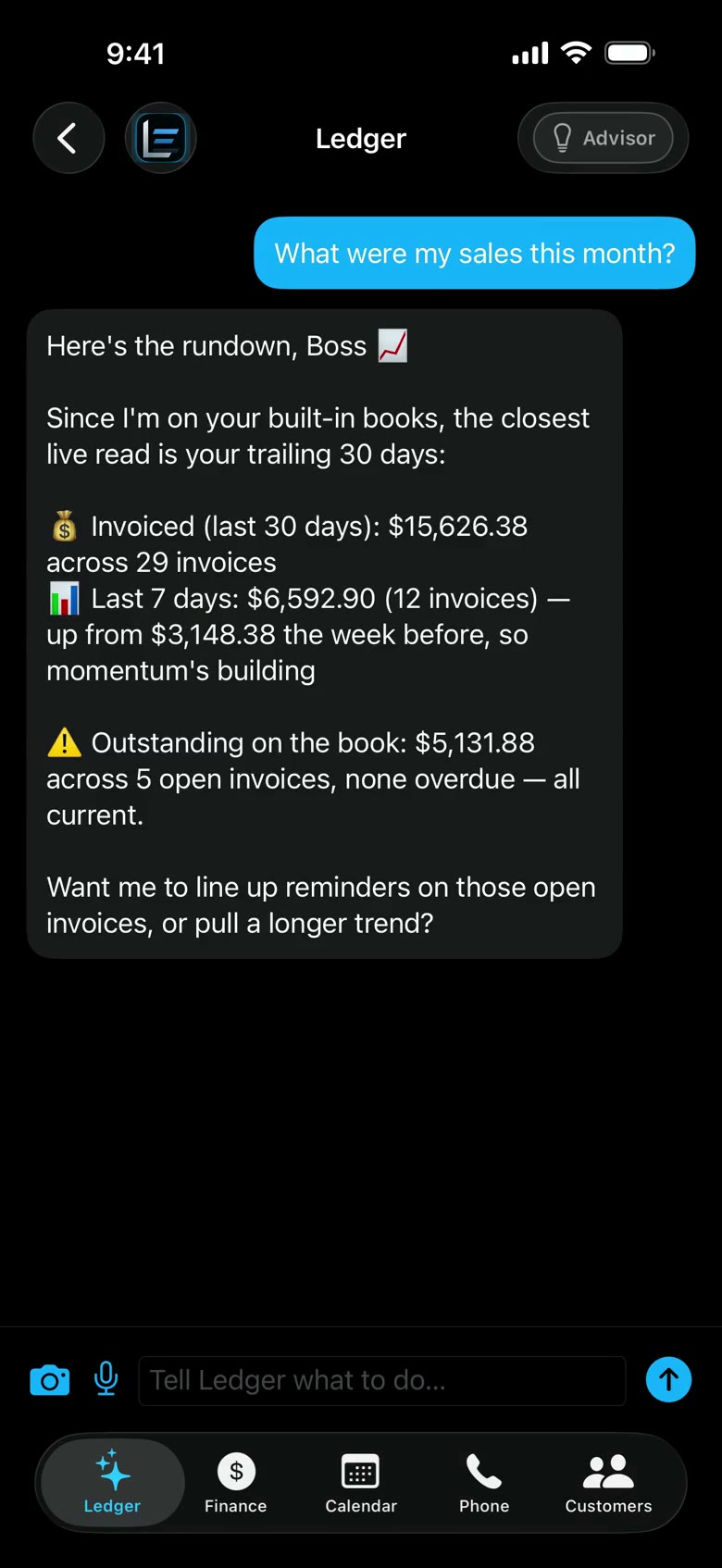
“How did we do this month?” Ask in plain English. Ledger reads your connected books and brings back the numbers that matter.

Your business, on speaking terms.

Explore ask ledger

02 / 08Inventory & pricing

Your prices.
Ready to quote.

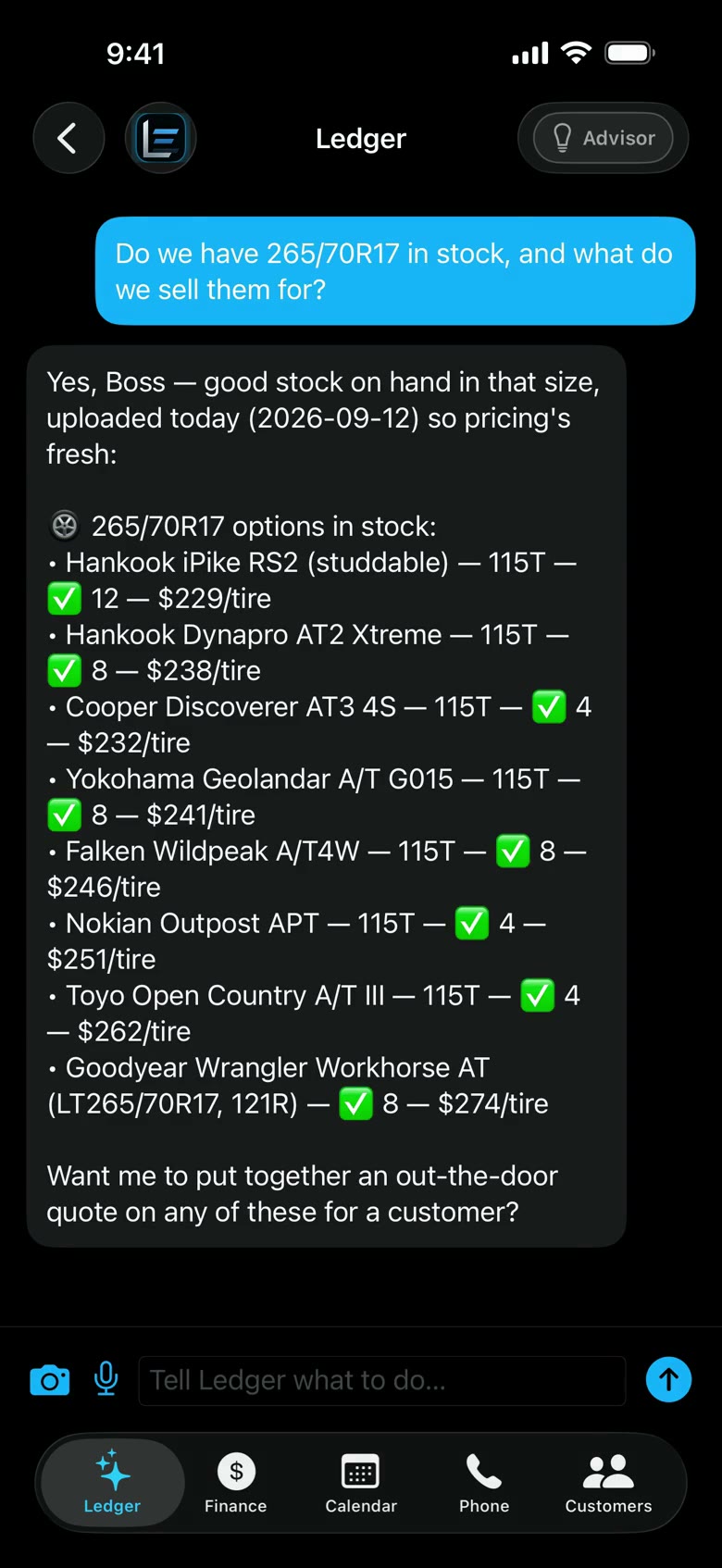
Bring your price list. Review the import. Then ask what’s in stock and what it sells for — without hunting through a spreadsheet.

Answers from the list you reviewed.

Explore inventory
03 / 08Invoices & getting paid

From the job
to the bottom line.

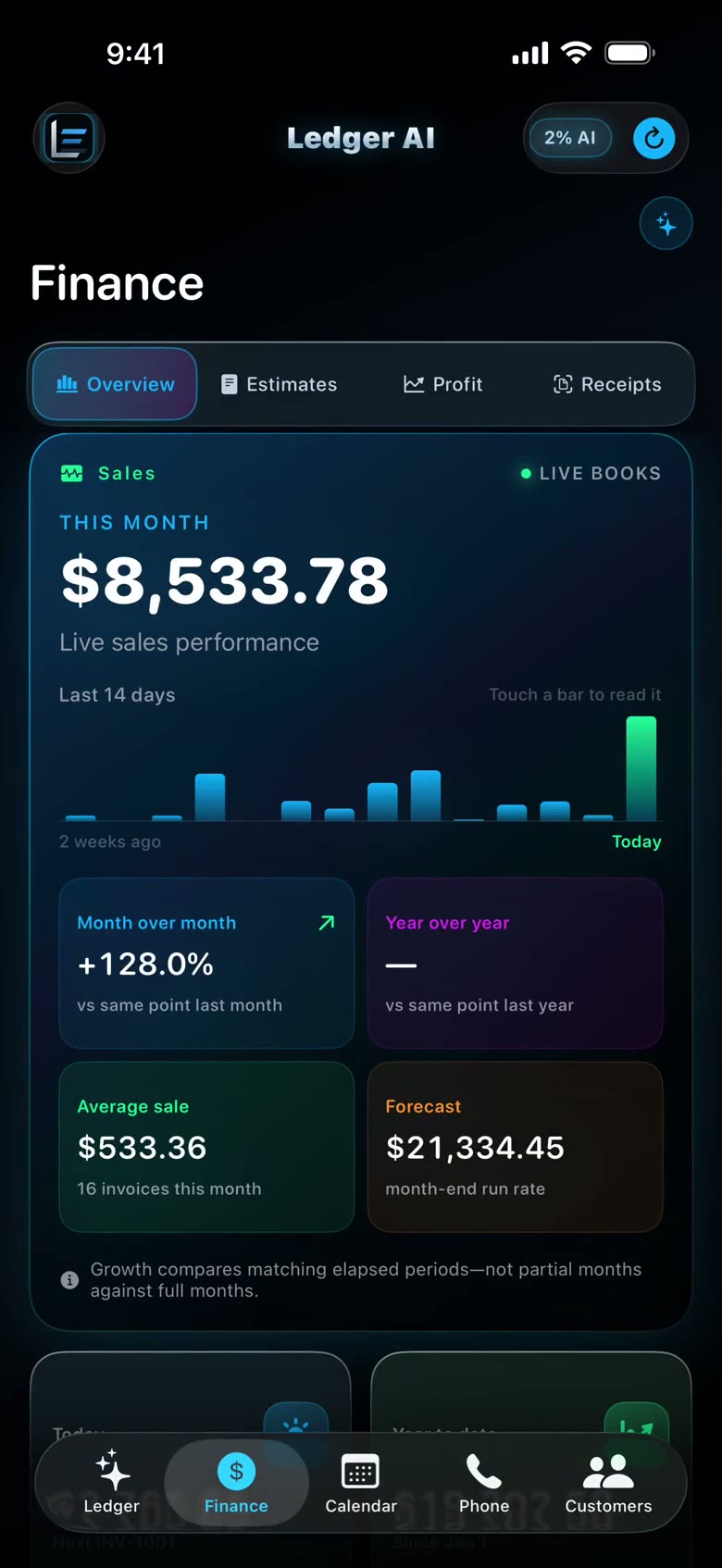
See your books, review a quote and understand your profit. QuickBooks or Ledger’s built-in books — you stay in control.

Drafted by Ledger. Confirmed by you.

Explore finance
04 / 08Booking & calendar

A full day.
A clearer picture.

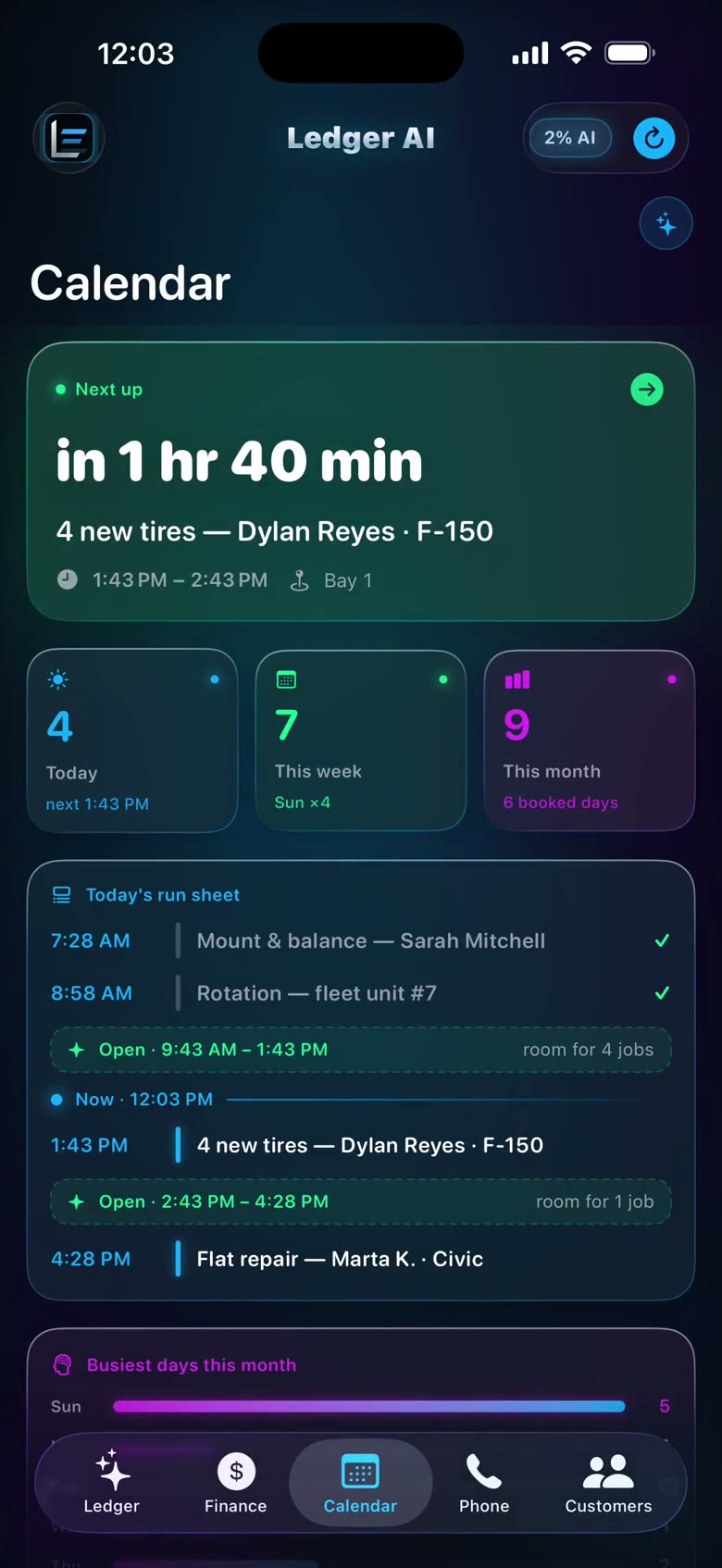
See what’s next, check the day’s jobs and let customers request a time from their own phone. No app download needed.

One calendar. Less back-and-forth.

Explore booking
05 / 08Business phone

Miss the call.
Keep the conversation.

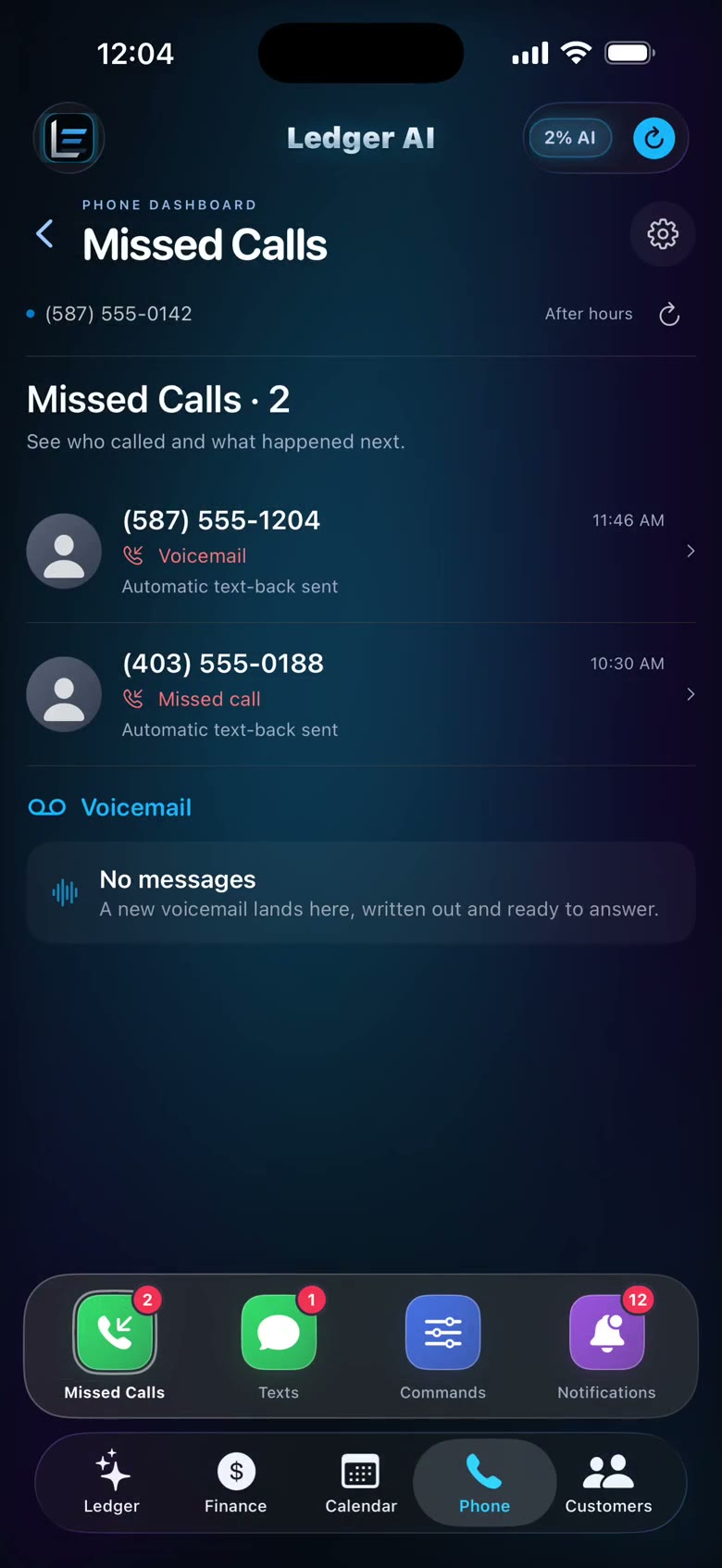
When you enable text-back, a missed call gets a reply. Voicemails, messages and new leads come together in one place.

Automatic lanes you choose to switch on.

Explore business phone
06 / 08Crew command

Out on the job.
Still in the picture.

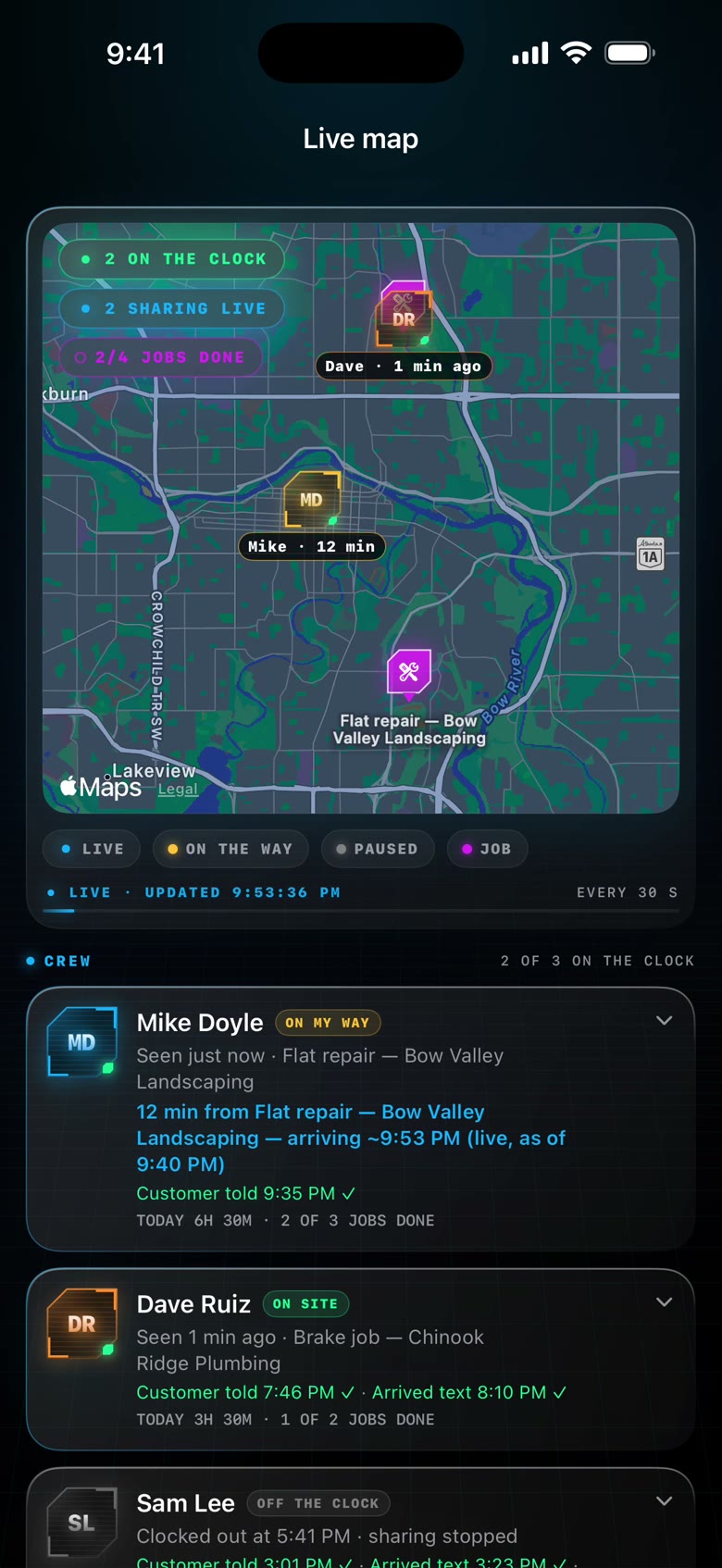
See who’s clocked in, open the crew map and review their time cards. A clearer view of the team, wherever the day takes you.

Worker links included with Pro.

Explore your crew
07 / 08Client hub

One simple link.
Their whole story.

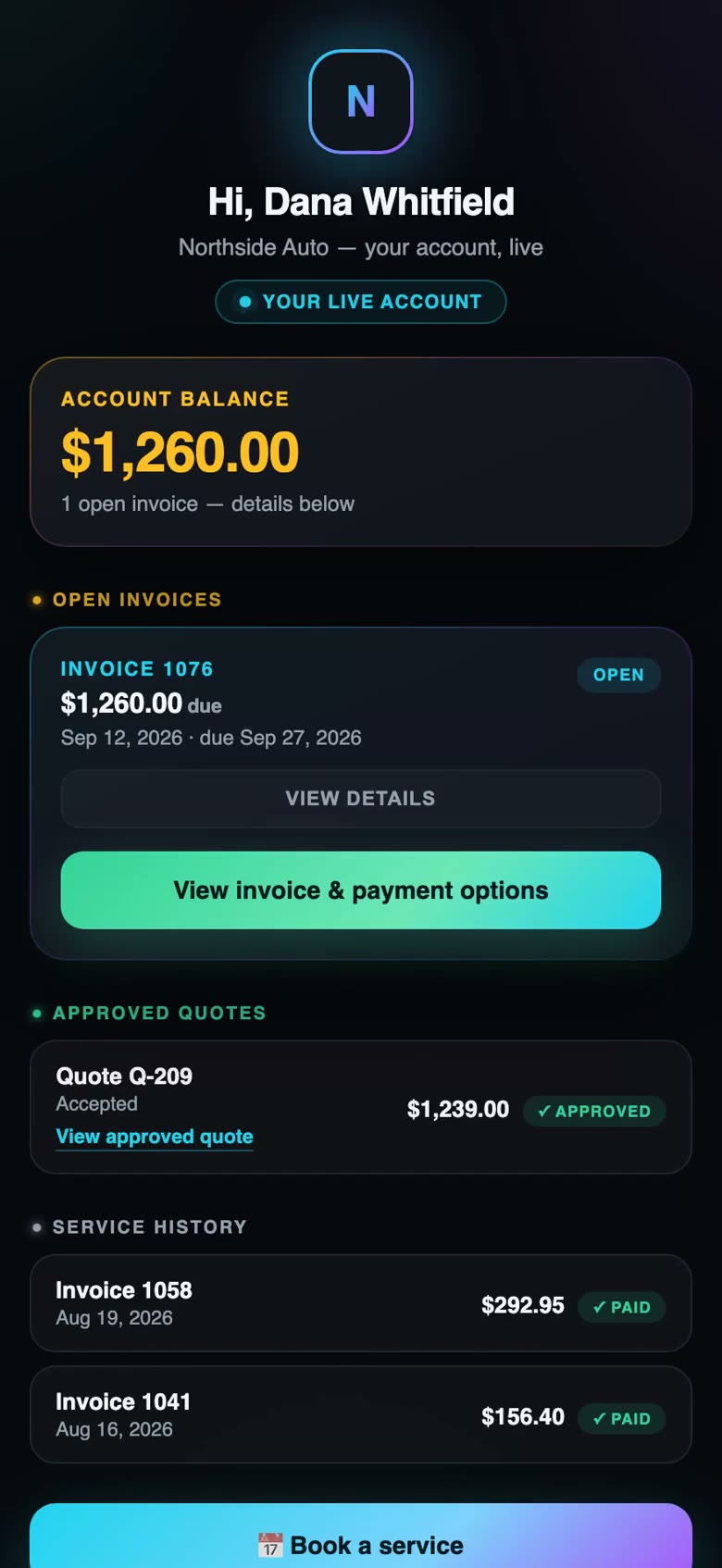
Customers can see invoices, respond to quotes and request their next service. You see the same relationship from your side.

No customer app. No customer seat fee.

Explore customers
08 / 08Reviews & reputation

Their feedback.
Your voice.

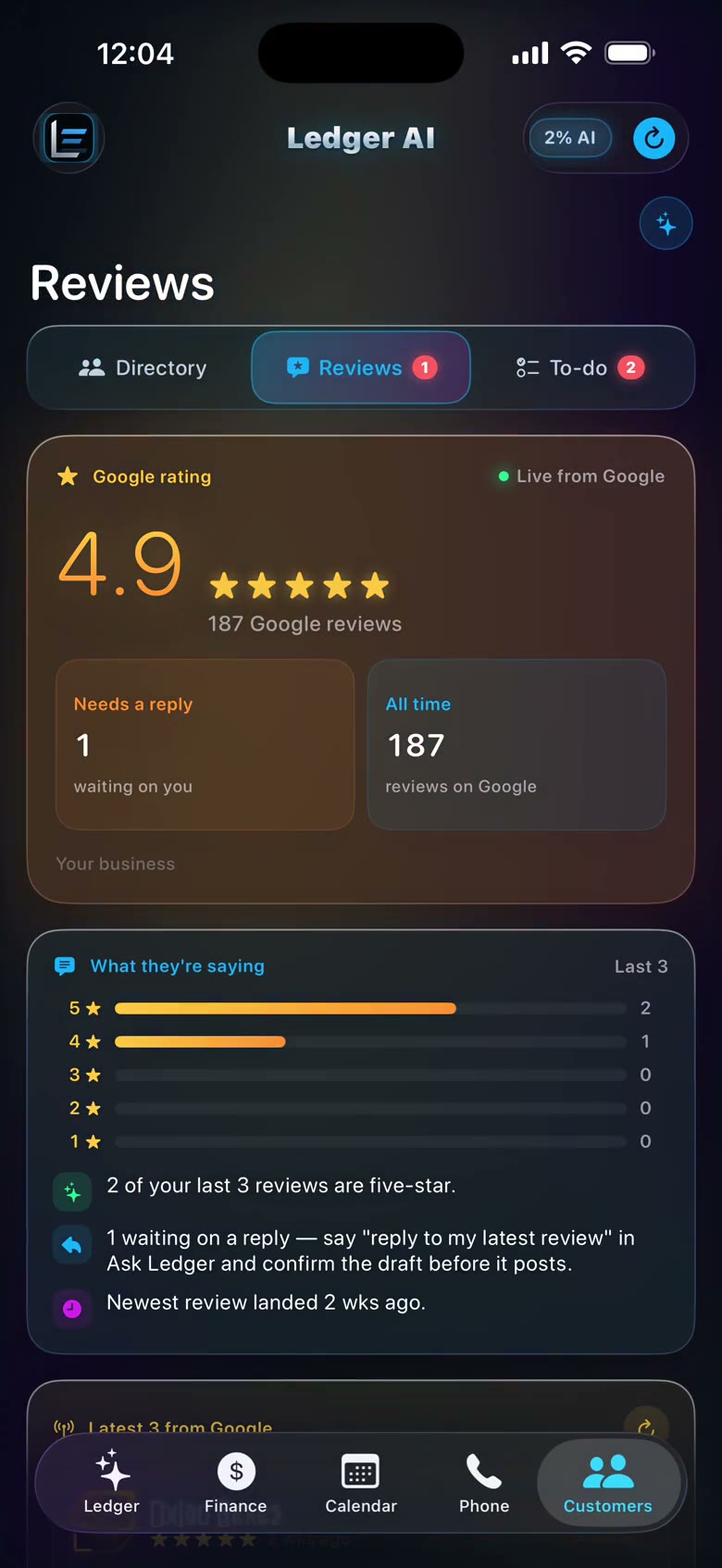
Read the review. Check Ledger’s suggested reply. Make it yours, then approve it for Google — every word stays in your hands.

Review first. Publish when you’re ready.

Explore reviews
Ledger AI Ask Ledger screen, recorded with demo data
01 Ask Ledger
Ledger AI Inventory screen, recorded with demo data
02 Inventory
Ledger AI Finance screen, recorded with demo data
03 Finance
Ledger AI Booking screen, recorded with demo data
04 Booking
Ledger AI Business phone screen, recorded with demo data
05 Business phone
Ledger AI Your crew screen, recorded with demo data
06 Your crew
Ledger AI Customers screen, recorded with demo data
07 Customers
Ledger AI Reviews screen, recorded with demo data
08 Reviews
Real app footage · silent

Drag to exploreSwipe to explore · or choose a topic above

Actual Ledger AI recordings · Northside Auto is a demo business with fictional customers and crew.
iPhone and web app footage. Features depend on plan and setup. Find your business fit ↗

Ledger AI in action

Real app footage · demo business · silent

This is a recording, not an interactive app. Use the player controls to pause or replay.

Ledger OS // From the founder
"I own a tire shop. I didn't want another piece of software — I wanted the missed calls answered, the invoices out, and to know what I made today without opening QuickBooks. So I built it, and it runs my shop every day. Nothing on this page is a mockup — it's a real shop, right now."
Kyle Maclean · Founder, Ledger AIOwner of KMJ Tire — Calgary, Alberta, Canada
$296,568invoiced out of the books Ledger reads and writes to since May 1 — 427 invoices, about $695 each
133receipts caught and filed automatically — not one of them typed by hand
0:04from missed call to text-back
0auto-posts to your books — every invoice, expense and payment waits for your tap
Counts from the founder’s own shop — its QuickBooks and its Ledger, May 1 to September 8, 2026. Not projections.
Ledger OS // Integrations

Plugs into what you already run

Four connections, each read-and-confirm — Ledger writes to them only when you confirm, or through a lane you switched on yourself. This is the Connections screen in the app, everything linked.

02Sign in with the provider, nothing elseEach connection is the provider's own sign-in page. Ledger never sees your password and never writes without your tap.
Ledger OS // Your first week

What happens after you sign up.

A practical path through your trial. Move at your own pace; provider connections and phone activation have their own requirements.

First · your account

Create your account and connect your books

Create your account, answer seven short questions about your business, connect QuickBooks — or use the built-in books if you don't have it — and ask your first question.

  • "Who owes me money?"
  • "What did I make today?"
  • Your 14 free days start now. No card.
Optional · 30-minute session

Optional free onboarding call

Work through your setup with Kyle, including the calendar and tools your plan includes. Identify the next steps for any connected services or phone activation.

  • Review phone activation and text-back settings
  • Check your booking page and availability
  • Explore crew links if your plan includes them
Next · a representative job

Your first real jobs run through it

An invoice drafted and sent with one tap. A customer approves a quote from their portal. A receipt filed from a photo.

  • Enable reminder texts after paid phone activation and review the saved message
  • Review manual actions; enabled automations follow your saved settings
Week 2 and on

Ledger runs the desk. You run the business.

Reviews answered in your voice, calls caught, crew clocked, money tracked — and you can ask about any of it from your phone.

  • Day 14: decide. Keep it, or walk away — nothing charged
Ledger OS // Founder access

Talk to the founder.

Kyle Maclean built and uses Ledger AI at KMJ Tire in Calgary. Book a free session to explore the fit or work through your setup.

Live availability from the founder's real calendar · Google Meet link on every booking · no account, no card.

Ledger OS // Pricing

Two plans. Pick your size.

The difference is people. Solo is you and the truck. Pro is you and a crew. Priced in your own currency — no conversion surprises.

Ledger Solo
$499$399
per month · USD or CAD
Founding price — locked for as long as you stay
14 days free · no card · cancel anytime

For the owner-operator — one owner login. No crew tools or time cards.

The AI Copilot — conversations with your live books, plus Advisor Mode & Receipt Radar
Invoicing & Getting Paid — drafting with tap-to-confirm, Stripe card payments, hosted pay pages, reminders
Client Hub — a personal portal for every customer, one-tap quote approvals included
Booking & Leads — public booking page, leads pipeline, night-before reminder texts
Business Phone — dedicated number, automatic missed-call text replies, voicemail transcripts
Reviews & Reputation — Google review replies drafted in your voice, you approve every word
  • $60/month AI allowance after the trial — top-ups anytimeAbout 11¢ a question · See how AI usage works →
  • Business number + $10/month texting included — top-ups anytime
  • Your customers never cost a seat — unlimited customer portals, $0 forever
  • iPhone & web (Android via the web app) — type it; voice conversation is temporarily paused
Start 14 days free →

No card to start. Move up to Pro any time — nothing is rebuilt, nothing is lost.

Ledger Pro · most popular
$799$699
per month · USD or CAD
Founding price — locked for as long as you stay
14 days free · no card · cancel anytime

For a business with staff — everything in Solo, plus the four things that only exist once you have people.

Everything in Ledger Solo, plus:
Crew Command — dispatch, live job links, morning day sheets, unlimited crew — no app for them to install
Time Cards — punch clock, server-stamped hours, overtime rules, payroll CSV export
Inventory & Pricing — review an uploaded price list and draft quotes from your own prices and recorded stock; no assumed live supplier feed
Front Desk — when enabled, Ledger handles customer texts and voicemail follow-up by text; paid phone activation and your saved settings apply
Teammate Logins — a second owner-level login with its own $50 AI allowance — $299/month each
  • $150/month AI allowance after the trial — top-ups anytimeAbout 11¢ a question · See how AI usage works →
  • Business number + $25/month texting included — about 2,000 texts
  • Crew & customers always free — unlimited crew links and customer portals, $0/seat
  • iPhone & web (Android via the web app) — type it; voice conversation is temporarily paused
Start 14 days free →

No card to start. Connect QuickBooks or use the built-in books, then try a representative workflow. Nothing is charged unless you choose a paid subscription.

Ledger OS // How seats work
  • One subscription runs one business. Either plan carries one set of books, one QuickBooks connection, one Google connection, and one business phone number — your workspace is your business, and everything in it belongs to you.
  • Teammates work inside your business. Ledger Solo is a single login; on Ledger Pro a $299/month seat gives a second person their own login and their own $50 AI allowance — everything they do lands in your books, on your calendar, on your line. Only the owner can invite, and the seat bills automatically when they join.
  • Your crew never costs a seat. On Ledger Pro, unlimited crew members get live job links, navigation, and the punch clock — no app, no account, $0 forever.
  • Your customers never cost a seat. Every customer gets a personal portal — live balance, invoices, one-tap quote approvals — at no charge, always.
Ledger OS // Straight answers

The questions that stop a $699 decision.

Answered the way we'd answer them across the counter.

Does it replace my bookkeeper or accountant?
No, and it isn't trying to. Ledger reads your live books so you can ask questions and get things done without waiting — it doesn't do your year-end. Most owners keep their bookkeeper and hand them cleaner books: receipts filed the day they arrive, invoices that actually went out, nothing missing at month-end.
What if I don't use QuickBooks?
You can still run everything. Ledger has its own built-in books — invoices, customers, receipts, who owes you — so you can start without QuickBooks and connect it later if you ever want to. If you're already on QuickBooks Online, you connect it once and Ledger works from your real numbers.
Who can see my books and my customers?
You, and anyone you invite as a teammate. That's it. We never sell your data, never use it for ads, and never train AI models on it. No Ledger staff reads your books or email as a matter of course — only if you ask us for help with something specific, and with your knowledge. Every connection can be cut off by you at any time from inside the app under Connections — QuickBooks, Gmail and Google alike (QuickBooks can also be cut from your Intuit account's connected apps). The full plain-English version is in our Privacy Policy.
Can it do something I didn't ask for?
Manual actions are drafted for your review and confirmation. Automation lanes you explicitly enable can act under their saved settings, including missed-call text-back, reminders, Pro Front Desk texts and scheduled Google posts. Check the relevant settings before enabling an automatic lane. Front Desk follows up on voicemail by text; this is not a promise of live voice answering.
How does the free trial work?
Create your account for a 14-day software trial, no card required. Eligible new owners and businesses receive one shared US$20 AI onboarding credit for the entire trial after email, two-step sign-in and phone verification. It does not reset monthly or multiply with teammates. AI pauses when the credit is used; saved setup remains available during the trial. Try the built-in books and a scripted phone walkthrough. Live calling/texting requires a paid subscription, an available number and provider activation; Front Desk requires Pro. Connected services need their own setup. On day 14 you decide: add a card and keep going, or do nothing and nothing is charged. If you keep it and later leave, cancel anytime from Business profile & settings → Subscription & billing — you keep access to the end of the month you've paid for.
How long does setup take, really?
Create your account and connect QuickBooks, or use the built-in books. Setup time depends on your records and provider connections. Booking and crew setup can be started from Business profile & settings. Live phone features require a paid plan, number availability and carrier activation; timing varies. Kyle can help on an optional free 30-minute onboarding call. There is no setup fee.
What does the AI allowance mean? Will I get surprise bills?
Ledger Solo includes $60 a month of AI use and $10 a month of texting on your business number. Ledger Pro includes $150 a month of AI use and $25 a month of texting. A question to Ledger costs about 11¢ on average, so $60 is roughly 550 questions a month and $150 roughly 1,400. Both meters are visible in the app. Texting usage depends on message length, destination and carrier charges. Any top-up is shown with its price before you buy it; nothing is added automatically. See exactly how AI usage works →
Does it work on Android, or on my desk computer?
Yes. Ledger runs on desktop and Android browsers, with iPhone access through TestFlight — same account, same books. Ask Kyle about current iPhone availability. Your crew and customers don't install anything at all: they get a link.
Ledger OS // Not ready to talk yet?

Get the 5-minute walkthrough by email.

Five short steps, written by the founder, showing exactly what Ledger does for a business like yours. No call, no follow-up sequence — one email, from the founder.

Reply to it and it lands straight in the founder's inbox.

Ready to talk to your books?

Start with your account and a representative workflow. Connect your books when ready, or ask Kyle for help with setup.

Start free — 14 days →
No card to start cancel anytime